编写海盗游戏的 Compose UI
在这个博客中,我将向大家展示如何使用 Jetpack Compose 编写一个简单的海盗游戏界面。通过这个游戏,玩家可以探索海洋、寻找宝藏和应对风暴。
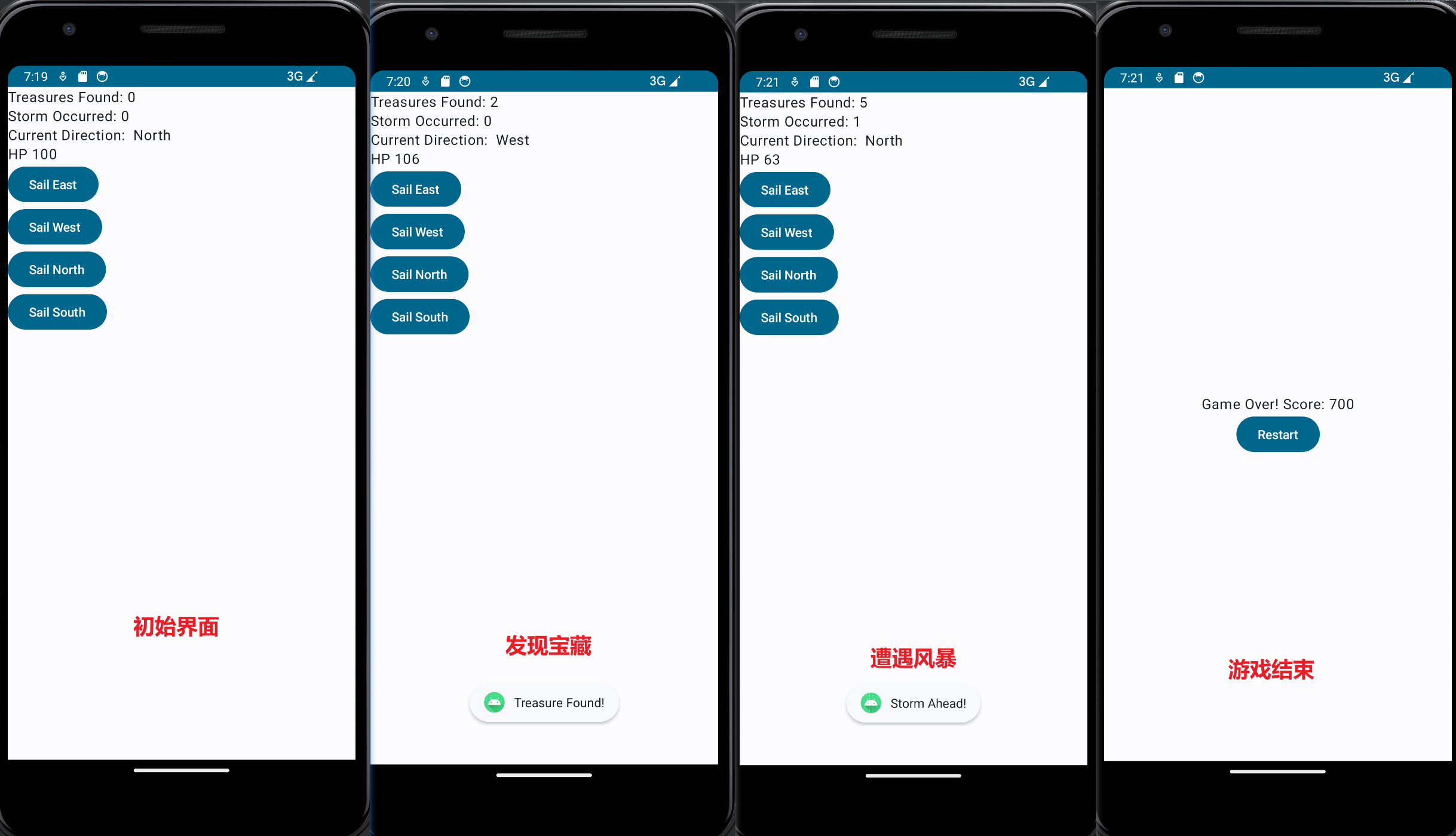
设置界面
我们首先需要设置界面的基本结构。在 MainActivity 中,我们使用 setContent 函数将界面内容设置为 CaptainGame 组件。这个组件是一个 @Composable 函数,负责渲染游戏界面。
游戏状态和逻辑
在 CaptainGame 中,我们使用 mutableStateOf 来定义游戏的状态。这些状态包括已找到的宝藏数量、遭遇的风暴次数、玩家的生命值和当前航行方向。我们还有一个 gameOver 状态,用于判断游戏是否结束。
根据游戏规则,如果生命值小于等于零且游戏还没有结束,那么游戏应该结束。在这种情况下,我们将 gameOver 设置为 true。
根据游戏是否结束,我们渲染不同的界面。如果游戏结束,我们显示一条消息,告诉玩家游戏结束并显示他们的得分。此外,我们还提供一个 "重新开始" 按钮,玩家可以点击它来重新开始游戏。
如果游戏没有结束,我们显示当前的游戏状态,比如已找到的宝藏数量、遭遇的风暴次数、当前航行方向和生命值。我们还提供了四个按钮,玩家可以点击它们来改变航行方向,并根据一定的概率遭遇风暴或找到宝藏。
界面布局和样式
为了使界面更美观,我们使用了 Column 组件来垂直布局界面元素。对于游戏结束时的界面,我们使用了 Modifier.fillMaxSize() 来使其占据整个可用空间,并使用 verticalArrangement 和 horizontalAlignment 属性来进行居中对齐。
我们还为重新开始按钮设置了最大宽度,并对其他按钮应用了默认样式。
代码
1
2
3
4
5
6
7
8
9
10
11
12
13
14
15
16
17
18
19
20
21
22
23
24
25
26
27
28
29
30
31
32
33
34
35
36
37
38
39
40
41
42
43
44
45
46
47
48
49
50
51
52
53
54
55
56
57
58
59
60
61
62
63
64
65
66
67
68
69
70
71
72
73
74
75
76
77
78
79
80
81
82
83
84
85
86
87
88
89
90
91
92
93
94
95
96
97
98
99
100
101
102
103
104
105
106
107
108
109
110
111
112
113
114
115
116
117
118
119
120
121
122
123
124
125
126
127
128
129
130
131
132
133
134
135
136
137
138
139
140
141
| package com.samsung.captaingame
import android.content.Context
import android.os.Bundle
import android.widget.Toast
import androidx.activity.ComponentActivity
import androidx.activity.compose.setContent
import androidx.compose.foundation.layout.Arrangement
import androidx.compose.foundation.layout.Column
import androidx.compose.foundation.layout.fillMaxSize
import androidx.compose.material3.Button
import androidx.compose.material3.MaterialTheme
import androidx.compose.material3.Surface
import androidx.compose.material3.Text
import androidx.compose.runtime.Composable
import androidx.compose.runtime.mutableStateOf
import androidx.compose.runtime.remember
import androidx.compose.ui.Alignment
import androidx.compose.ui.Modifier
import androidx.compose.ui.tooling.preview.Preview
import com.samsung.captaingame.ui.theme.CaptainGameTheme
import kotlin.random.Random
class MainActivity : ComponentActivity() {
override fun onCreate(savedInstanceState: Bundle?) {
super.onCreate(savedInstanceState)
setContent {
CaptainGameTheme {
Surface(
modifier = Modifier.fillMaxSize(),
color = MaterialTheme.colorScheme.background
) {
CaptainGame(this)
}
}
}
}
}
@Composable
fun CaptainGame(context: Context) {
val treasuresFound = remember{ mutableStateOf(0) }
val stormOccurred = remember { mutableStateOf(0) }
val hp = remember { mutableStateOf(100) }
val direction = remember{ mutableStateOf("North") }
val gameOver = remember{ mutableStateOf(false) }
if (hp.value <= 0 && !gameOver.value) {
gameOver.value = true
}
if (gameOver.value) {
Column(
modifier = Modifier.fillMaxSize(),
verticalArrangement = Arrangement.Center,
horizontalAlignment = Alignment.CenterHorizontally
) {
Text(text = "Game Over! Score: ${treasuresFound.value * 100}")
Button(onClick = {
treasuresFound.value = 0
stormOccurred.value = 0
hp.value = 100
gameOver.value = false
}) {
Text("Restart")
}
}
}
else {
Column {
Text(text = "Treasures Found: ${treasuresFound.value}")
Text(text = "Storm Occurred: ${stormOccurred.value}")
Text(text = "Current Direction: ${direction.value}")
Text(text = "HP ${hp.value}")
Button(onClick = {
direction.value = "East"
if (Random.nextDouble() < 0.2) {
stormOccurred.value += 1
Toast.makeText(context, "Storm Ahead!", Toast.LENGTH_SHORT).show()
hp.value -= 50
} else if (Random.nextDouble() < 0.5) {
treasuresFound.value += 1
Toast.makeText(context, "Treasure Found!", Toast.LENGTH_SHORT).show()
hp.value += 1
} else {
hp.value += 2
}
}) {
Text("Sail East")
}
Button(onClick = {
direction.value = "West"
if (Random.nextDouble() < 0.2) {
stormOccurred.value += 1
Toast.makeText(context, "Storm Ahead!", Toast.LENGTH_SHORT).show()
hp.value -= 50
} else if (Random.nextDouble() < 0.5) {
treasuresFound.value += 1
Toast.makeText(context, "Treasure Found!", Toast.LENGTH_SHORT).show()
hp.value += 1
} else {
hp.value += 2
}
}) {
Text("Sail West")
}
Button(onClick = {
direction.value = "North"
if (Random.nextDouble() < 0.2) {
stormOccurred.value += 1
Toast.makeText(context, "Storm Ahead!", Toast.LENGTH_SHORT).show()
hp.value -= 50
} else if (Random.nextDouble() < 0.5) {
treasuresFound.value += 1
Toast.makeText(context, "Treasure Found!", Toast.LENGTH_SHORT).show()
hp.value += 1
} else {
hp.value += 2
}
}) {
Text("Sail North")
}
Button(onClick = {
direction.value = "South"
if (Random.nextDouble() < 0.2) {
stormOccurred.value += 1
Toast.makeText(context, "Storm Ahead!", Toast.LENGTH_SHORT).show()
hp.value -= 50
} else if (Random.nextDouble() < 0.5) {
treasuresFound.value += 1
Toast.makeText(context, "Treasure Found!", Toast.LENGTH_SHORT).show()
hp.value += 1
} else {
hp.value += 2
}
}) {
Text("Sail South")
}
}
}
}
|
游戏界面
总结
通过这个简单的海盗游戏示例,我们展示了如何使用 Jetpack Compose 构建一个基于状态的界面,并处理用户交互和游戏逻辑。希望这个示例能为你提供一些关于使用 Compose 构建应用程序的启示。
完整的代码示例可以在 GitHub 上找到。
如果你对此感兴趣,可以尝试扩展游戏功能,比如增加更多的交互元素和游戏规则。祝你编写出令人愉快的海盗游戏!
知识点
remember: remember 是一个用于在 Compose 组件中创建可记忆状态的函数。它接收一个初始值,并返回一个包含状态值的可记忆对象。这个记忆对象在组件的重组或重新绘制过程中会被保留,以确保状态的连续性和一致性。当组件被重新绘制时,它会重新获取之前的记忆对象,而不是重新创建一个新的对象。mutableStateOf:Compose 中的一种可变状态容器 mutableStateOf 是一个函数,用于创建可变的状态对象。它接收一个初始值,并返回一个包含状态值和更新状态值的函数的对象。通过调用返回的函数,我们可以在组件中修改状态的值。每当状态值发生变化时,Compose 会重新绘制组件,并在界面上反映出新的状态。
val 关键字用于声明不可变的引用,即一旦引用被初始化后,它将无法指向其他对象,为什么treasuresFound用val修饰呢?
总之,使用 val 来修饰 treasuresFound 可以确保其引用的不可变性,而通过返回的 mutableStateOf 对象可以修改其值,从而同时满足状态的稳定性和可变性的需求
1
| val treasuresFound = remember{ mutableStateOf(0) }
|
当treasuresFound的值变化了(mutableStateOf),Compose 将会自动检测到状态的变化并更新相关的 UI