Android Activity
Intent
显式intent
- 明确指定了要启动的目标组件,适用于启动应用内的组件。
- 适合用于应用内部的组件通信,例如从一个 Activity 启动另一个 Activity。
- 显式 Intent 的启动速度相对较快,因为系统直接知道要启动的组件。
Intent有多个构造函数的重载,其中一个是Intent(Context packageContext, Class<?> cls),第一个参数要求提供被启动Activity的上下文,第二个参数Class用于指定想要启动的目标Activity,通过这个构造函数就能构建出“意图”
Activity类中提供一个startActivity()方法,用于启动Activity,它接收一个Intent参数
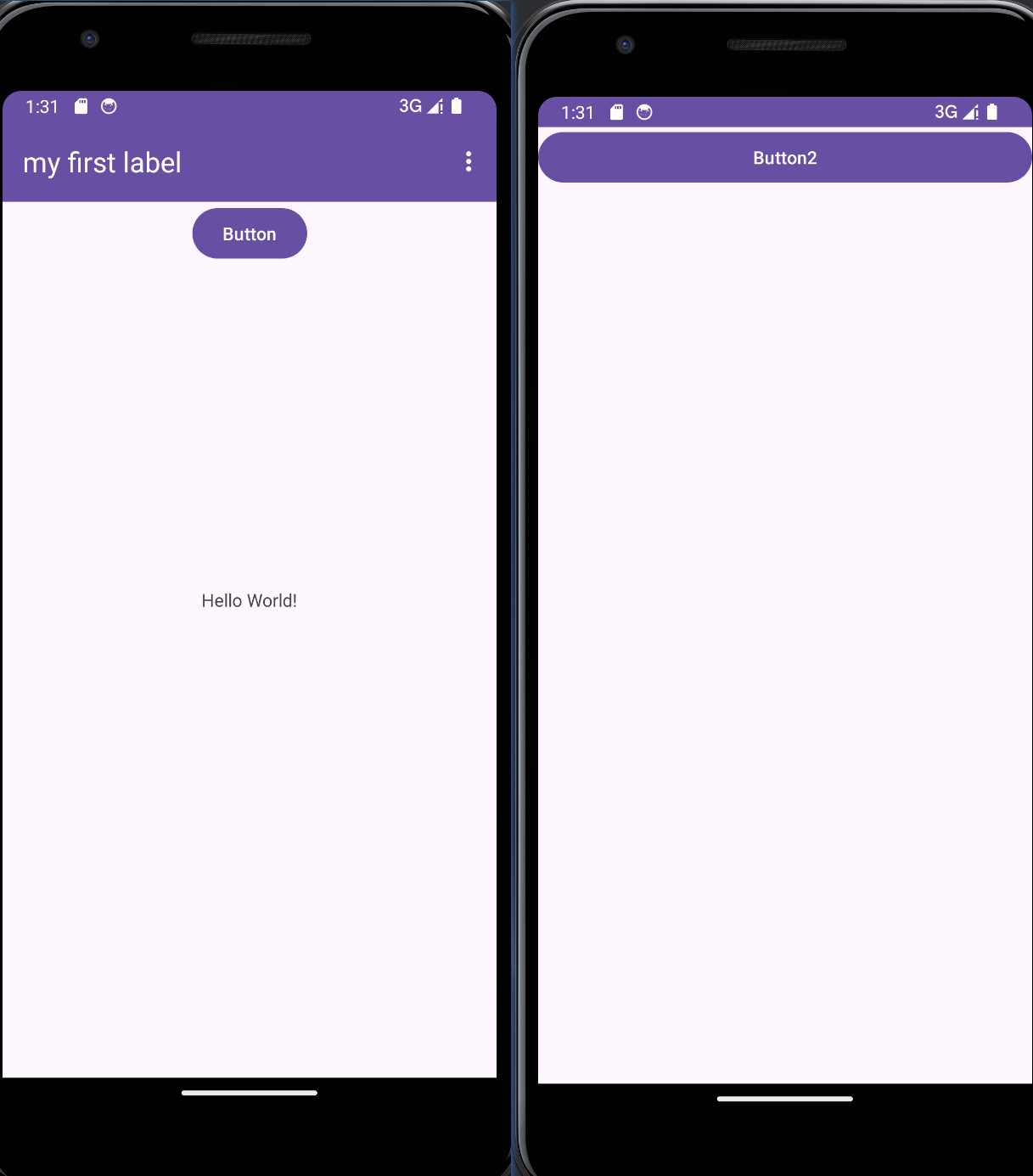
eg.有两个Activity,点击activity_main(左图)中的button,可以跳转到activity_button,核心代码如下
1 | |
隐式intent
- 不指定目标组件的类名,而是根据 Intent 的内容和 Intent Filter 动态地查找适合处理该 Intent 的组件。
- 适用于希望系统为我们选择合适的组件来处理某个动作的情况,例如发送邮件、分享内容等。
- 隐式 Intent 的使用可以增加应用的灵活性,因为它允许系统根据条件选择合适的组件来处理 Intent。
需要action与category同时满足才能响应
AndroidManifest.xml
1 | |
MainActivity.kt
1 | |
每个intent只能指定一个action,但能指定多个category
AndroidManifest.xml
注意
1 | |
MainActivity.kt
1 | |
遇到的bug
之前android:exported="false"的时候,使用隐式intent无法跳转,但是使用显式intent能跳转,改成true之后能正常跳转,但是在官网看到,设置为false应该不影响在同一个应用程序访问,疑问???
android:exported 属性用于设置某个组件(activity、服务、广播接收器等)是否可以由其他应用的组件启动:
- 如果设为
true,则任何应用都可以访问相应的 activity,并通过其确切类名称启动它。 - 如果设为
false,则只有同一应用的组件、具有相同用户 ID 的应用或具有特权的系统组件可以启动该 activity。
其他隐式intent用法
访问网页
1 | |
Intent.ACTION_VIEW常量:"android.intent.action.VIEW"表示浏览动作
Uri.parse("https://www.google.com")表示将一个网址字符串解析成一个Uri对象,在调用Intent的setData()(kotlin语法糖)将这个Uri对象传递给intent。
bug
点击按钮跳转至谷歌浏览器,然后整个电脑死机!尝试分配更大的内存以及磁盘,还没解决!
向下一个Activity传递数据
使用putExtra与get$typeExtra
MainActivity.kt
1 | |
SecondActivity.kt
1 | |
在logcat检索verbose level的日志

返回数据给上一个Activity
MainActivity使用startActivityForResult(新版本已废弃)启动SecondActivity,其中startActivityForResult的第二个参数是全局唯一的请求码,
MainActivity.kt
1 | |
SecondActivity.kt
1 | |
Inflate的含义
当编写了一个XML layout,它会通过在内存中创建视图对象下·来被渲染
When you write an XML layout, it will be inflated by the Android OS which basically means that it will be rendered by creating view object in memory. Let's call that implicit inflation (the OS will inflate the view for you). For instance:
1 | |
You can also inflate views explicitly by using the LayoutInflater. In that case you have to:
- Get an instance of the
LayoutInflater - Specify the XML to inflate
- Use the returned
View - Set the content view with returned view (above)
For instance:
1 | |